
How Can AI Agents Increase Contractors' ROI?
AI Agents for Contractors: How to Reduce Administrative Costs, Improve Lead Follow-Up, and Increase Business Capacity.
AI Agents can provide contractors with a return on investment (ROI) by reducing administrative work, accelerating lead response, improving estimate follow-up, coordinating context-dependent multi-step workflows, reducing missed opportunities, and allowing employees to handle more work without a proportional increase in administrative staffing. |
The biggest opportunity is not necessarily replacing employees. It is increasing the capacity of the people already running the business.
AI agents are most valuable when a workflow requires interpreting unstructured information, choosing among approved next steps or adapting to different situations. Predictable actions such as sending reminders, creating CRM records and updating statuses, are usually better handled through traditional automation.
For contractors, that can mean faster lead response, more consistent follow-up, fewer missed handoffs, less manual CRM work, better scheduling coordination, and more time for sales, customers and project execution.
But there is an important qualification: not every contractor needs an AI Agent.
If a workflow is predictable and can be handled reliably with traditional automation, an AI Agent may add unnecessary complexity. The right starting point is the business process, the measurable problem and the expected financial benefit.
1TC Perspective Don't start with the Agent. Start with the process. |

Introduction: The ROI Problem Contractors Often Don't See
Running a contracting business is not just about completing projects.
Behind every job are dozens of administrative activities:
Answering inquiries
Capturing leads
Returning calls
Qualifying prospects
Scheduling estimates
Following up on proposals
Updating the CRM
Sending reminders
Coordinating information
Processing documents
Communicating with customers
Tracking open opportunities
For a small or mid-sized contractor, much of this work falls on the owner, office manager, salesperson or project manager. That creates an expensive problem.
The person who should be selling, managing customers or overseeing projects may instead be spending hours moving information from email to a CRM, responding to repetitive questions, checking whether an estimate was followed up, or coordinating appointments.
This is where AI Agents can become interesting.
The opportunity is not simply to "use AI."
1TC Perspective The opportunity is to turn administrative effort into business capacity. |
The Associated General Contractors of America (AGC) and Sage reported in their 2026 Construction Hiring and Business Outlook that 61% of surveyed construction firms said they were using AI or planned to increase their investment in AI, up from 44% the previous year. Among the reported applications, 45% were using AI for office and administrative functions, 23% for estimating, and 20% for design or preconstruction activities.
These findings suggest that construction firms are currently applying AI primarily to office, administrative, estimating, and preconstruction processes - areas where repetitive information processing and coordination can create opportunities for greater efficiency. However, AI adoption alone does not demonstrate ROI. Contractors still need to measure whether a specific implementation reduces administrative effort, improves response times, increases employee capacity, reduces rework, improves project execution, or contributes to measurable financial outcomes.
A separate ServiceTitan 2026 State of AI in the Trades survey of 1,032 commercial and residential contractors across seven trades found that 12% had already embedded AI into their processes, while 34% were experimenting with AI. Among contractors already using AI, 62% reported measurable gains in efficiency and productivity.
What Is an AI Agent for Contractors?
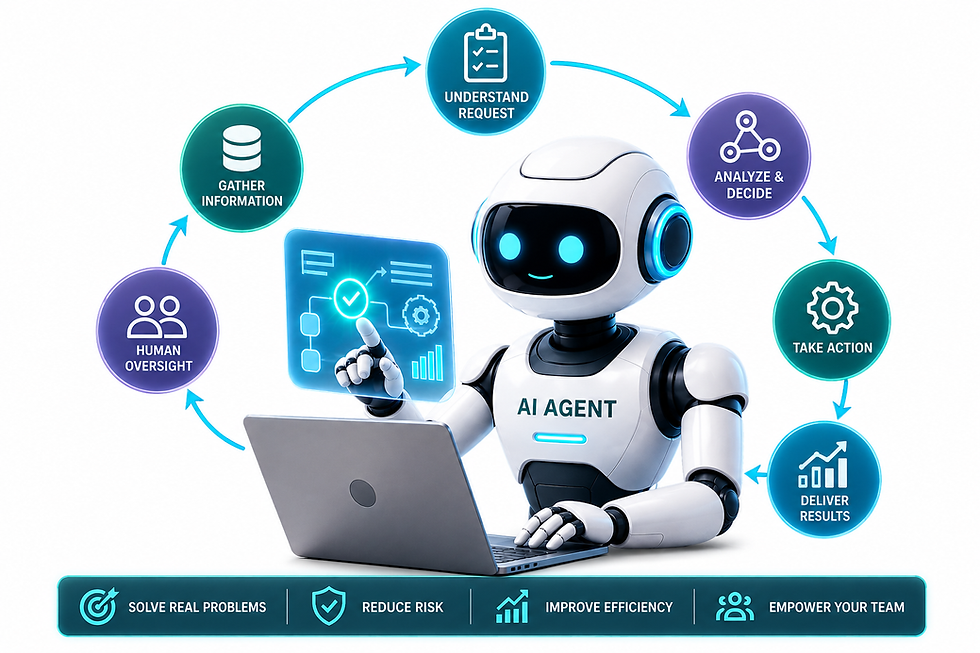
An AI agent is software that uses an AI model to understand context, choose among permitted actions and use connected tools or systems to pursue a defined business goal with limited autonomy. In a well-designed contractor workflow, rules and controls restrict what the agent may do, validate important actions and escalate uncertainty, exceptions and consequential decisions to authorized staff
That makes an AI Agent different from a basic chatbot.
A chatbot primarily answers questions or generates information.
An AI Agent can potentially:
Receive information
Interpret it
Determine the next step
Access an approved system
Perform an action
Check the result
Continue the workflow
Escalate to a person when necessary
For example, imagine a contractor receives this message:
"Hi, We need to replace our roof after the storm. We're located in Weston and would like an estimate next week. Thanks, Client1" |
A basic automation may simply create a task.
An AI Agent could potentially:
Identify the inquiry as a roofing opportunity
Extract the location
Identify the requested service
Check whether required information is missing
Create or update the CRM record
Send an approved response
Offer available appointment times
Create the appropriate follow-up task
Escalate the opportunity to a salesperson
The important word is potentially. An agent may add value when it must adapt the next approved step based on the customer’s responses, availability and missing information. The agent should only perform actions that the business has intentionally authorized.
AI Automation vs. AI Assistant vs. AI Agent
Use the least-complex technology that reliably solves the problem.
For contractors, the distinction is important. Not every process requires an AI Agent. Predictable activities such as sending appointment reminders, updating CRM records, creating tasks, or changing a work-order status are usually better handled through traditional automation.
AI Agents become more relevant when a workflow requires the system to interpret information, determine the appropriate next step, work across multiple systems, or adapt to different situations within defined rules.
Technology | What it is | How it works | Level of autonomy | Best for |
AI Automation | A predefined workflow that uses AI as one or more steps in the process. | Trigger → predefined steps → outcome | 🟢 Low | Repetitive, predictable processes |
AI Assistant | An AI tool that helps a person perform a task by answering questions, generating content, summarizing information, or providing recommendations. | Person asks → AI responds → person decides/acts | 🟡 Medium | Tasks requiring human interaction and judgment |
AI Agent | An AI system that can pursue a defined goal, make decisions within approved boundaries, use connected tools, and execute multiple steps with limited human intervention. | Goal → AI evaluates → takes approved actions → checks results → adjusts or escalates | 🔴 High | Complex, multi-step processes requiring interpretation and decisions |
Some of the capabilities are:
Capability | Rules-Based Automation | AI Assistant | AI Agent |
Primary role | Execute predefined steps | Answer, explain or create information | Coordinate multiple steps toward a goal |
Decision logic | Fixed rules | Responds to user context | Interprets context within guardrails |
Typical input | Structured data | Questions/prompts | Emails, documents, messages and system data |
System access | Defined integrations | Limited or approved tools | Multiple approved systems |
Best contractor use | Reminders, CRM updates, notifications | Customer questions, summaries, drafting | Lead intake, routing, follow-up and coordination |
Human oversight | Exceptions | Reviews outputs | Approvals, escalation and monitoring |
Complexity | Low | Moderate | Higher |
Risk | Usually, lower | Depends on data/access | Increases with autonomy |
The principle is simple: Use the least complex technology that reliably solves the business problem.
1TC Perspective Don't start with the AI Agent. Start with the key contractor's process. |
First determine whether the problem can be solved with rules-based automation. If the process requires human judgment but benefits from faster access to information, an AI Assistant may be sufficient. Consider an AI Agent when the workflow requires interpretation, contextual decisions, multiple steps, or coordination across systems. For a broader look at when AI Agents make sense for small and mid-sized businesses, see our guide to AI Agents for Small Business.
The objective is not to deploy more AI. It is to use the right level of technology to reduce administrative work, increase team capacity, improve customer response, and help the contractor grow without adding unnecessary operational complexity.
Before investing in an AI Agent, contractors can use an AI Readiness Assessment to evaluate their workflows, systems, data, and readiness for AI adoption.
How AI Agents Can Increase Contractor ROI
Contractor ROI from AI Agents generally comes from four areas:
Lower operating costs
Higher revenue opportunities
Greater employee capacity
Improved operational consistency
Let's look at each one.
1. Reduce Administrative Costs
Contractors frequently have employees spending time on activities that do not directly generate revenue. Predictable tasks such as creating records, sending reminders, updating statuses and assigning tasks, are usually best handled through traditional automation. AI becomes valuable when the process requires interpreting inquiries, documents or customer messages and choosing the appropriate next step. Together, AI, AI Agents and automation can reduce administrative workload and release employee capacity. The financial benefit does not necessarily come from eliminating a position. It comes from allowing existing employees to spend more time on sales, customer service and project execution.
If an office employee spends 10 hours per week on repetitive administrative work and an AI-enabled workflow reduces that workload to four hours, the business releases six hours of weekly capacity for higher-value activities.
Activities these technologies can support include:
Entering customer information
Copying information between systems
Sending appointment reminders
Checking for missing information
Creating CRM tasks
Preparing routine communications
Following up with inactive leads
Routing customer requests
2. Respond to Leads Faster
A contractor can spend thousands of dollars generating leads and still lose opportunities because nobody responds quickly enough.
A lead may arrive while the owner is on a job site, driving, meeting a customer, inspecting a property, preparing an estimate or managing a crew.
The problem isn't necessarily lead generation. It can be lead response and follow-up.
New lead → interpret inquiry → capture information → qualify → respond → schedule → update CRM → escalate |
3. Improve Estimate Follow-Up
One of the most valuable contractor workflows is often the one that happens after the estimate.
A contractor may prepare an estimate, send it to the customer and then become busy with the next job. The result? The follow-up becomes inconsistent.
Tracking open estimates
Identifying opportunities requiring follow-up
Preparing personalized follow-up messages
Sending approved communications
Scheduling the next follow-up
Updating CRM status
Escalating high-value opportunities to a salesperson
4. Increase Sales Capacity
Imagine a salesperson currently spends part of everyday updating the CRM, checking lead status, sending reminders, scheduling appointments and preparing routine communications.
Those activities consume capacity. An AI Agent can potentially handle portions of the administrative workflow.
Customer conversations
Site visits
Estimates
Negotiation
Relationship building
Closing opportunities
5. Reduce Missed Opportunities
Revenue leakage can happen in surprisingly simple ways: a lead is never called back, an estimate is never followed up, a customer inquiry is routed to the wrong person, a CRM record is incomplete, a scheduling request is missed, or a dormant lead is forgotten.
These may not appear as AI problems. They are workflow problems.
Lead received → qualification → CRM → follow-up → appointment → estimate → follow-up → close |
6. Reduce Rework and Administrative Friction
Construction and field-service businesses operate across many systems. Information can move between email, CRM, scheduling, accounting, project management, documents and customer communications.
Every manual handoff creates an opportunity for duplicate entry, missing information, incorrect information, delays, miscommunication and rework.
An AI-enabled workflow can potentially help connect those handoffs. The objective is not to automate everything. It is to reduce unnecessary friction.
Duplicate entry
Missing information
Incorrect information
Delays
Miscommunication
Rework
Contractor AI Agent Use Cases
Contractor Workflow | AI Agent Role | Human Role | ROI Opportunity |
Lead intake | Interpret inquiry and capture information | Review qualified opportunity | Faster response and fewer missed leads |
Lead qualification | Classify opportunity and identify missing information | Decide whether opportunity is worth pursuing | Better sales capacity |
Estimate follow-up | Track open estimates and initiate approved follow-up | Handle negotiation and closing | Recover potential lost revenue |
Scheduling | Coordinate available appointments | Handle exceptions | Less administrative time |
CRM administration | Interpret contextual information when needed to Create/update records and tasks | Review exceptions | Lower data-entry workload |
Customer inquiries | Classify and route requests | Handle complex customer issues | Faster response |
Document processing | Extract approved information | Validate important information | Reduce manual processing |
Dormant leads | Identify candidates for reactivation | Manage sales conversation | Recover potential opportunities |
When Traditional Automation Is Better
An AI Agent should not be the default answer.
The process is predictable
The same trigger produces the same action
Inputs are structured
Rules are clear
Exceptions are limited
A standard integration can solve the problem
A wrong automated action could have significant consequences
For example:
When a customer completes a form, create a CRM record, assign it to the sales representative and send a confirmation email. |
That probably does not require an AI Agent. Traditional workflow automation may be simpler, less expensive and more predictable.
An AI Agent becomes more attractive when the input is unstructured, the next action depends on context, the workflow contains manageable variations, interpretation is required, and the agent can safely escalate consequential decisions.
Agents can introduce additional cost, processing time, testing requirements and the possibility of compounding errors. Their complexity should be justified by measurable improvements that simpler technology cannot provide.
1TC Perspective Don't use an AI Agent because it is newer. Use it because it creates more measurable business value than a simpler alternative. |
How Much ROI Can a Contractor Get from an AI Agent?
There is no universal ROI number. The answer depends on workflow volume, labor cost, current inefficiency, revenue opportunity, AI Agent cost, implementation cost, integration cost, adoption, performance and risk controls.
A contractor should establish a baseline before implementing the technology.
Number of leads per month
Average response time
Lead-to-estimate conversion
Estimate-to-job conversion
Follow-up completion
Administrative hours
Cost per administrative transaction
Missed opportunities
Average job value
Rework
Customer response time
A Contractor-Specific AI Agent ROI Example
Consider an illustrative contractor evaluating an AI-enabled workflow for lead intake, follow-up, and administrative coordination.
The purpose of this example is to show how a contractor can build an ROI business case, not to predict a guaranteed financial return. The most important step is to establish a baseline and replace these assumptions with the company's actual data.
Illustrative assumptions
Metric | Assumption |
Leads per month | 100 |
Administrative time per lead | 15 minutes |
Fully loaded labor cost | $30/hour |
Administrative capacity released | 7 hours/week |
Additional annual revenue | $8,000 |
Annual error/rework savings | $2,000 |
Other measurable avoided costs | $1,000 |
Annual AI Agent, implementation, integration, training & support cost | $7,000 |
The 100 leads per month and 15 minutes of administrative work per lead represent approximately 25 administrative hours per month, or about 300 hours per year before considering other workflow activities. The example assumes the improved workflow ultimately releases 7 hours of administrative capacity per week.
Calculating the potential value
Step | ROI Component | Calculation | Result |
1 | Capacity released | 7 hrs/week × 52 weeks × $30/hour | $10,920 |
2 | Additional revenue | Estimated measurable annual revenue impact | $8,000 |
3 | Error/rework savings | Estimated annual reduction in rework and related costs | $2,000 |
4 | Other avoided costs | Estimated measurable annual avoided costs | $1,000 |
5 | Total potential annual value | $10,920 + $8,000 + $2,000 + $1,000 | $21,920 |
6 | AI Agent investment | Technology + implementation + integration + training + support | $7,000 |
7 | Net annual value | $21,920 − $7,000 | $14,920 |
8 | Illustrative ROI | ($21,920 − $7,000) ÷ $7,000 × 100 | ≈ 213% |
What the numbers actually mean
The $21,920 total should not automatically be interpreted as $21,920 in cash savings.
The components represent different types of business value:
$10,920 — Capacity value: represents 364 hours of administrative capacity released during the year (7 × 52), valued at $30/hour. This does not automatically mean the contractor reduces payroll by $10,920.
$8,000 — Additional revenue: represents incremental revenue attributed to the improved process. The contractor would need to establish how much of that revenue is actually attributable to the workflow and, ideally, consider the associated gross margin when evaluating financial impact.
$2,000 — Error/rework savings: represents an assumed reduction in actual costs associated with errors or rework. This should be supported by baseline measurements.
$1,000 — Avoided costs: should represent a cost that the contractor would otherwise have incurred and can reasonably attribute to the improved process.
$7,000 — Technology investment: represents the annual cost of the AI Agent solution and related implementation and support.
Capacity released is not the same as cash savings
For a contractor, the 7 hours per week of capacity released may be valuable even when payroll does not decrease.
That capacity could instead be used to:
Follow up on more estimates
Respond to customer inquiries faster
Coordinate jobs and technicians
Manage more projects
Reduce administrative backlog
Improve customer communication
Support additional revenue-generating activities
Therefore, a contractor should distinguish between capacity value, actual cost savings, and incremental revenue rather than treating all three as interchangeable.
Capacity Value ($10,920) + Incremental Revenue ($8,000) + Cost Savings ($2,000) + Avoided Costs ($1,000) = Total Potential Annual Business Value ($21,920).
Use the formula carefully
The standard ROI calculation used in this example is:
ROI = (Annual Benefit − Annual AI Agent Cost) ÷ Annual AI Agent Cost × 100
Using the illustrative numbers:
ROI = ($21,920 − $7,000) ÷ $7,000 × 100 = 213.1%
However, the quality of the ROI calculation depends on the quality of the benefit assumptions. If the contractor cannot reliably monetize the $10,920 capacity value, for example, it should not automatically be counted as cash benefit.
A more conservative calculation using only the $8,000 revenue + $2,000 savings + $1,000 avoided costs would be:
$11,000 measurable financial benefit
ROI = ($11,000 − $7,000) ÷ $7,000 × 100 = 57.1%
This illustrates an important point: the way a contractor defines and measures benefits can materially change the ROI calculation.
1TC Perspective The objective is not to make an AI Agent investment appear attractive by assigning a dollar value to every hour saved. The objective is to determine whether the technology creates measurable business value.
|
What Contractors Should NOT Let an AI Agent Decide
More autonomy means more responsibility. Give AI Agents autonomy within defined boundaries, but keep high-impact decisions with people.
Estimating
Pricing
Contract commitments
Negotiations
Customer disputes
Legal decisions
Financial approvals
High-value purchases
Complex technical decisions
Safety-related decisions
Unusual customer situations
The agent should operate inside clearly defined boundaries.
Permissions
Approval thresholds
Escalation rules
Audit logs
Data-access restrictions
Monitoring
Human review
The more authority an agent has, the stronger these controls need to be.
Contractor AI Readiness Checklist
Before buying or building an AI Agent, ask these questions:
# | Readiness Question | What to Confirm | Flag |
1 | Is the workflow clearly defined? | Employees generally follow a consistent process. If the process varies significantly, document and stabilize it first. | ☐ |
2 | Is there a clear process owner? | A specific person is accountable for the workflow, its rules, and ongoing performance. | ☐ |
3 | Is the process stable? | Business rules, responsibilities, and workflow steps are reasonably consistent and not constantly changing. | ☐ |
4 | Is the data reliable? | Customer, lead, job, scheduling, and project data is sufficiently accurate and complete to support the workflow. | ☐ |
5 | Are your systems organized? | CRM, scheduling, accounting, project management, and other systems have clear ownership and reasonably defined data flows. | ☐ |
6 | Can successful completion be verified objectively? | There is a clear result that confirms the workflow was completed correctly—for example, a properly created customer or job record. | ☐ |
7 | Can traditional automation solve the problem? | If predictable rules can solve the workflow, consider traditional automation before introducing an AI Agent. | ☐ |
8 | Where is AI interpretation actually required? | A specific step requires AI to interpret information, classify requests, determine context, or select an appropriate next action. | ☐ |
9 | What can the Agent do? | The Agent's authorized actions are explicitly defined—for example, creating records, sending approved messages, assigning tasks, or updating status. | ☐ |
10 | What must always require human approval? | High-impact, sensitive, financial, contractual, customer, or exception-based decisions have clearly defined human approval points. | ☐ |
11 | Can you measure ROI? | Baseline metrics and success measures are defined, such as administrative hours, response time, follow-up rate, conversion, rework, cost, or revenue. | ☐ |
If you cannot measure the baseline, it will be difficult to prove whether the investment worked.
The 30-60-90 Day Contractor AI Implementation Approach
First 30 Days: Discover and Measure
Start with the process.
One high-volume workflow
Current process steps
Systems involved
Manual work
Handoffs
Exceptions
Current costs
Current performance
Baseline KPIs
Then determine whether traditional automation, AI-assisted workflow or an AI Agent is appropriate.
Days 31-60: Pilot One Workflow
Choose one relatively low-risk, measurable process.
Lead intake
Lead qualification
Estimate follow-up
Scheduling coordination
CRM administration
Document intake
Keep humans involved. Measure response time, hours saved, follow-up completion, errors, conversion and volume handled.
Days 61-90: Measure and Scale
Compare actual performance against the baseline.
Did administrative time decrease?
Did response time improve?
Did follow-up improve?
Did conversion improve?
Did employees adopt the workflow?
Did errors decrease?
Did customer experience improve?
Did the business generate measurable financial value?
If yes, consider expanding. If not, simplify the workflow, adjust the process or determine whether traditional automation would be a better solution.
1TC Perspective
Don't Start with the AI Agent, the starting point is not: "Where can we put AI Agents?" but "Where is your team losing time, capacity, revenue or consistency?"
|
From there, the approach is:
Discover → Simplify → Automate → Add AI Where It Creates Value → Control → Measure → Scale
|
1mpact Technology Consulting (1TC) can help contractors:
Identify high-value workflows
Conduct an AI readiness assessment
Determine the appropriate technology level
Calculate the potential ROI
Design the workflow
Integrate approved systems
Establish permissions and controls
Train employees in multilanguage (English, Spanish, and Portuguese)
Measure business outcomes
Scale successful workflows
This may include AI & Automation, Technical Advisory, Operations Optimization, Fractional CTO or Fractional CAIO support.
The objective is not to sell contractors more technology. The objective is to help them select the right technology for the right business problem.
A contractor does not necessarily need an AI Agent. A contractor needs a better-performing business process.
1TC Perspective
The goal is not to deploy more AI or Tools. The goal is to create measurable business value with the right level of automation, cost, risk and human oversight.
|
Explore Your Contractor Business Automation Opportunities!
Is your contractor business’ team spending too much time coordinating repetitive work? 1mpact Technology Consulting (1TC) can help you identify the highest-value automation opportunities, evaluate where AI Agents make sense, and build a practical roadmap based on measurable business outcomes. Schedule a free Contractor Technology Consultation! Click here. |
Frequently Asked Questions
What is an AI Agent for contractors?
An AI Agent is software that can interpret business information, determine the next step within defined rules and permissions, and use approved systems to complete multiple steps in a contractor workflow. Examples include lead intake, qualification, CRM updates, appointment coordination and estimate follow-up. Unlike a basic chatbot, an AI Agent can potentially move a workflow forward rather than simply provide information. Human oversight remains important for pricing, estimating, negotiations and other consequential decisions.
How can AI Agents increase contractor ROI?
AI Agents can increase contractor ROI by reducing administrative labor, improving lead response, increasing follow-up consistency, reducing missed opportunities, coordinating repetitive workflows and increasing employee capacity. The financial benefit can come from lower operating costs, additional revenue, reduced rework and the ability to handle more business without proportionally increasing administrative resources. ROI should be measured against the actual cost of software, implementation, integration, training and ongoing support.
What contractor tasks can AI Agents automate?
Potential contractor uses cases include lead intake, lead qualification, CRM updates, estimate follow-up, appointment coordination, customer inquiry routing, document processing, status communications and dormant-lead reactivation. The best opportunities are usually frequent, measurable, multi-step workflows that require some interpretation or coordination. Predictable tasks such as simple reminders or fixed CRM updates may be better handled by traditional workflow automation.
Can AI Agents improve estimate follow-up?
Yes. An AI Agent can potentially monitor open estimates, identify when follow-up is due, prepare approved communications, initiate follow-up and create escalation tasks. The contractor or salesperson should remain responsible for negotiation, pricing and closing decisions. The goal is to make follow-up more consistent so that legitimate opportunities are not lost simply because someone became busy and failed to follow up.
Should a contractor use an AI Agent or traditional automation?
Use traditional automation when the process is predictable, rules are clear and the same trigger reliably produces the same action. Consider an AI Agent when the workflow requires interpretation, classification, contextual decisions or coordination across multiple systems. Starting with the least complex technology that solves the problem is usually the better approach. An AI Agent should add measurable business value rather than simply increase technological complexity.
How do I calculate the ROI of an AI Agent?
A practical formula is: ROI = (Annual Business Benefit − Annual AI Agent Cost) ÷ Annual AI Agent Cost × 100
Annual business benefit can include labor capacity released, additional revenue, error/rework savings and avoided costs. AI Agent cost should include software, implementation, integrations, training and support. Establish the current baseline before deployment and compare actual performance after implementation to determine whether the projected ROI was achieved.
Does a contractor need an IT team to implement an AI Agent?
Not necessarily. However, someone must own the process, integrations, permissions, controls and ongoing monitoring. A contractor can work with an external technology advisor to assess readiness, design workflows, implement integrations, establish controls, train employees and measure results. The important requirement is not necessarily an internal IT department; it is having clear ownership and appropriate technology and governance expertise.
Author & Expertise
Written by Rose Fasanelli, Partner & Business Development Director.
Rose Fasanelli brings more than 35 years of global technology leadership experience across digital transformation, business growth, customer experience, AI, automation and technology-enabled innovation. She has been recognized as a HITEC 100 honoree and brings enterprise-level technology experience to the SMB market. Connect via LinkedIn
Reviewed by Vanessa Ballarte, Partner & AI Solutions Director.
Vanessa is a business and technology executive with more than 25 years of experience across corporate strategy, P&L management, operations, AI & digital transformation. A former Managing Director and Board Member of OMRON Healthcare, Vanessa now serves as Director of AI Solutions at 1TC, where she helps organizations turn strategic priorities and emerging technologies into practical solutions that deliver measurable business impact. Connect via LinkedIn
References & Further Reading
Source | Reference |
The Associated General Contractors of America (AGC) and Sage | |
ServiceTitan — 2026 State of AI in the Trades | |
McKinsey — How AI Is Reshaping the Future of the AEC Industry | |
NIST — AI Risk Management Framework | |
1mpact Technology Consulting | |
1mpact Technology Consulting - Blog - AI Agents for Small Business | |
1mpact Technology Consulting — AI Automation Services | |
1mpact Technology Consulting — Technology Advisory | |
1mpact Technology Consulting — South Florida Business Process Automation | |
1mpact Technology Consulting — AI Readiness Assessment |


Comments